Candle Jar and Box Mockup for Canva
If you are launching a candle business or updating your brand's visual identity, the difference between a product that looks amateurish and one that sells often comes down to presentation. Many creators rush into designing labels without first visualizing how those designs will look on actual packaging. This is where the Candle Jar and Box Mockup for Canva becomes an essential tool. It bridges the gap between a flat digital file and a tangible, market-ready product image, allowing you to showcase your work with professional realism.
This specific bundle is designed to streamline your workflow by mimicking the precision of Photoshop but within the user-friendly environment of Canva. Whether you are a small business owner preparing for launch, a freelancer pitching to clients, or a hobbyist sharing your creations online, having high-quality mockups is non-negotiable. However, simply downloading a template isn't enough; understanding its limitations and capabilities is what separates a good result from a great one.
Understanding the Realism Factor
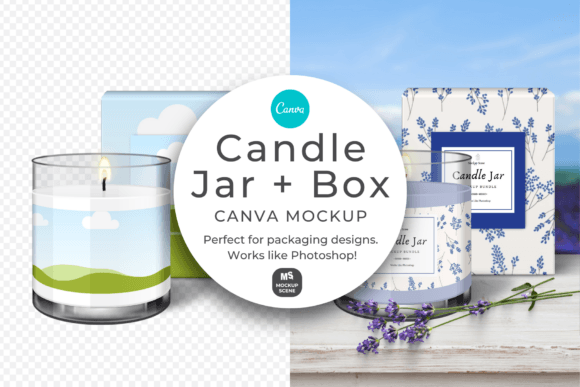
One of the primary reasons creators choose this mockup set is the attention to detail regarding transparency and texture. Unlike basic overlays that sit flatly on top of an image, the glass sections of these candle jars are actually transparent. This means you can see your background color or texture through the jar, creating a depth that is crucial for e-commerce photography. If you place a white label on a clear jar against a dark background, the mockup will realistically show the dark hue reflecting through the glass, adding a layer of authenticity that generic templates lack.
Furthermore, the candle wax itself is fully editable. You are not stuck with a default yellow or pink shade. You can customize the wax color to match your scent profile or design aesthetic, ensuring that the final image accurately represents the product you intend to sell. The dimensions of 6000 x 3000 pixels offer a perfect 3:2 ratio, which is ideal for shop images and social media feeds, providing high resolution without unnecessary cropping.
Pitfalls in Usage and Licensing
While the tool is powerful, there are common misunderstandings regarding how it should be used and distributed. A significant portion of potential issues arises from confusion over licensing terms found in Creative Fabrica's terms of use. It is vital to understand that while this mockup bundle is excellent for displaying your personal or commercial designs, it cannot be resold as a standalone asset.
The "Resale" Trap: Many beginners assume that because they can download the file, they can also sell it. This is incorrect. Reselling the mockups in any format is strictly prohibited. Furthermore, copying any part of these mockups into new Canva templates for sale or free distribution is not allowed. Infringements of these rules will be prosecuted, which can lead to legal trouble and the loss of your platform accounts. Always read the full Terms and Conditions if you are unsure about commercial use.
The Missing Context Mistake: Another frequent error involves the pre-made patterns and samples shown in the 'After' graphics. These examples are for inspiration only and are not included in the download. Users sometimes expect to receive the exact floral patterns or textured backgrounds seen in the promotional images. When they don't find them in their folder, they may feel the product is incomplete. In reality, you are expected to create your own unique textures or import your own assets to fill the clip frames. Relying on the assumption that all decorative elements are provided can delay your project timeline significantly.
Optimizing Your Workflow and Output
To get the most out of the Candle Jar and Box Mockup for Canva, you need to approach the design process with a clear strategy. The drag-and-drop functionality works like Photoshop, utilizing custom-created clip frames. However, efficiency drops if you do not prepare your files correctly before importing them.
Start by ensuring your label designs are high-resolution and properly sized for the clip frame. While the mockup allows for resizing, starting with low-quality assets will result in pixelated outputs, regardless of the mockup's quality. Once your design is placed, take advantage of the transparency features. Don't just slap your logo on the jar; consider how the background interacts with the glass. Using a subtle gradient or a textured backdrop behind the jar can elevate the perceived value of your product instantly.
If file size is a concern for your website or social media upload limits, remember that you have control over the final output. You can compress the download file quality if you want a smaller version, or resize it to a smaller dimension before downloading. This step is often overlooked, leading to slow-loading web pages or rejected uploads on platforms with strict file size caps.
Evaluating Before You Commit
Before purchasing or downloading this resource, take a moment to evaluate your specific needs. Are you looking for a quick solution to visualize a single design, or do you need a comprehensive suite for a full product line? This mockup is particularly effective for showcasing individual items or small collections. If you require complex lighting setups or 3D rotations that go beyond the capabilities of Canva's 2D layers, you might need more advanced software.
Check the compatibility of your current Canva plan. While many features are accessible, some advanced editing tools or stock assets might require a Pro subscription. Ensure you have the necessary access to avoid frustration mid-project. Additionally, verify that the box and jar shapes align with your actual physical packaging. Using a mockup of a square jar when your product is cylindrical will mislead customers and damage your credibility.
Final Thoughts on Professional Presentation
The goal of using a Candle Jar and Box Mockup for Canva is to communicate quality before the customer ever touches the product. By avoiding common licensing errors, respecting the limitations of the included assets, and taking time to customize the wax colors and backgrounds, you ensure your brand stands out in a crowded marketplace. Remember, the mockup is a tool for display, not a product to be sold itself. Treat it with the respect it deserves, and it will serve as a reliable partner in building your brand's visual identity.
Take the time to experiment with different backgrounds and wax shades. The ability to customize these elements is what gives the mockup its true power. Whether you are a seasoned marketer or a beginner entrepreneur, mastering this tool will save you money on photoshoots and allow you to iterate on your designs faster than ever before. Focus on creating realistic, high-impact images that tell the story of your brand, and let the mockup handle the technical heavy lifting.