Procreate Tree Landscape Brush Stamp Set: A Practical Guide to Avoiding Common Pitfalls
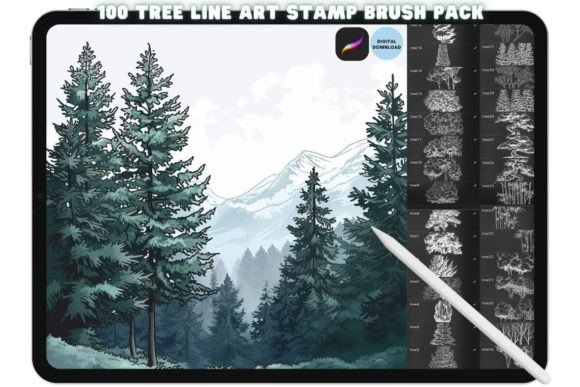
If you have ever stared at a blank canvas in Procreate, struggling to render the intricate details of a forest or a sprawling meadow, you understand the frustration of time-consuming manual drawing. This is exactly where the Procreate Tree Landscape Brush Stamp Set transforms from a simple tool into an essential asset for your digital workflow. Designed specifically for artists, illustrators, and content creators who need high-quality botanical elements without the hours of hand-drawing, this collection offers 100 unique stamps that breathe life into any scene instantly.
However, acquiring the brushes is only the first step. Many users rush through the installation process or misunderstand how these digital assets function, leading to poor results that make the product seem ineffective. To ensure you get the most out of this purchase, it is crucial to navigate the setup correctly and understand the specific capabilities of these stamps before diving into your next project.
Understanding What You Are Actually Buying
Before you download anything, it is vital to clarify the nature of this product. The Procreate Tree Landscape Brush Stamp Set is not a physical item; it is a purely digital download available immediately after purchase. There are no shipping delays, no packaging, and no physical brushes to hold. Instead, you receive a link to access high-quality .brushset files containing detailed line art.
These are not generic clipart images pasted onto a layer. Each stamp is meticulously crafted to provide realistic texture and structure suitable for professional illustrations, pattern design, and complex backgrounds. When used correctly, they allow you to build rich landscapes with a single tap, saving significant time while maintaining artistic integrity. Whether you are a freelancer meeting tight deadlines or a hobbyist looking to enhance your digital journal, these tools streamline the creative process.
The Installation Trap: Why Your Brushes Might Not Appear
One of the most common mistakes beginners make involves the installation process. Because the file format (.brushset) requires specific handling within the Procreate ecosystem, simply clicking "download" on a computer often leads to confusion when trying to open it on an iPad. If you do not follow the correct sequence, the brushes will not load into your library, leaving you with a set of files you cannot use.
To avoid this headache, remember that the installation must happen directly on the device running Procreate. After purchasing, you will be provided with a download link. Open this link using your iPad browser. Do not attempt to transfer the files via email or cloud storage if possible, as this can sometimes break the direct association with the app. Once the file is downloaded on the iPad, locate the file in your Files app or the download folder.
The Critical Step: Tap on the file and select Open With, then choose Procreate. This action triggers the automatic import sequence. If you try to open the file with a different app or simply double-tap it without selecting Procreate, the brushes will not appear in your library. By following this specific path, you ensure that the 100 stamps are seamlessly integrated into your existing brush settings.
Common Usage Mistakes That Ruin Your Artwork
Even after successful installation, many users struggle to utilize the stamps effectively. A frequent error is treating these stamps as final images rather than foundational elements. Because the stamps are designed as detailed line art, they are meant to be colored, textured, and blended, not left as black-and-white silhouettes.
- Misunderstanding Layering: Placing a tree stamp directly on top of a flat color background often looks unnatural. Instead, place the stamp on a separate layer above your base colors. Use blending modes like Multiply or Overlay to integrate the shadows and highlights of the stamp with your scene's lighting.
- Ignoring Scale and Perspective: Using a large tree stamp in the foreground alongside a tiny one in the distance without adjusting opacity or size can break the illusion of depth. Always scale your stamps relative to the viewer's perspective to maintain realism.
- Overusing Stamps: Relying too heavily on the same few designs can make your work look repetitive. The strength of this set lies in its variety. Mix different tree types, densities, and orientations to create dynamic compositions that feel organic rather than assembled.
Evaluating Quality Before You Commit
Not all digital assets are created equal. When evaluating the Procreate Tree Landscape Brush Stamp Set, look for evidence of meticulous craftsmanship. High-quality stamps should feature clean lines without jagged edges or pixelation, even when scaled up significantly. If a stamp looks blurry or distorted when you resize it, the resolution is likely too low for professional work.
Additionally, consider the versatility of the set. A good landscape collection includes various species, seasons, and stages of growth. Check the preview images to ensure the set offers enough diversity to support long-term projects. If the collection contains only a handful of similar pine trees, it may limit your ability to create varied environments. The goal is to find a set that acts as a comprehensive toolkit, allowing you to sketch out a forest, a garden, or a jungle with ease.
Maximizing Efficiency and Cost-Effectiveness
For entrepreneurs, marketers, and educators, time is money. The efficiency gained from using these stamps can drastically reduce the time spent on illustration tasks. However, the cost-effectiveness depends on how well you leverage the tool. Buying a stamp set that sits unused because you don't know how to install it or apply it is a waste of resources.
By mastering the installation and understanding the layering techniques, you turn a one-time purchase into a recurring productivity booster. You can quickly generate concept art for blog posts, educational materials, or marketing campaigns. This allows you to focus more on the narrative and less on the technical execution of drawing every leaf by hand.
Final Thoughts on Making the Right Choice
The decision to invest in digital assets should always be driven by a clear understanding of how they fit into your workflow. The Procreate Tree Landscape Brush Stamp Set is a powerful resource for anyone looking to elevate their digital illustrations with realistic botanical elements. It eliminates the tedious task of drawing complex foliage from scratch, providing instant access to high-quality line art.
Remember, the success of your project relies on proper setup and thoughtful application. Ensure you open the files correctly on your iPad, respect the layering hierarchy in your composition, and utilize the full range of designs available in the set. By avoiding common installation errors and adopting a strategic approach to usage, you will unlock the true potential of these stamps, creating stunning landscapes that captivate your audience.
Whether you are refining a portfolio piece, designing a book cover, or creating engaging social media content, this tool offers the flexibility and quality needed to produce professional results. Take the time to learn the nuances of the brushes, experiment with different blending modes, and watch your creative output reach new heights.